
Anyone who answers the question "What format should I use?" at random while looking at the camera is unaware of the inevitable loss of image quality that follows. Choosing a video codec isn't a technical detail; it's a decision that directly determines how much information the image will carry, how much flexibility you'll have on the editing table, and what the viewer will see on screen at the moment of delivery. H.264, H.265, ProRes, and RAW... these four different video formats represent four different ways of thinking in video production. Going into the camera menu and picking a format without knowing the difference is like starting construction without understanding the properties of your materials.
Let's First Clarify the Basic Concept: What Is a Codec?
The word codec is short for "coder/decoder." It's the algorithm responsible for compressing video data (encoding) and decompressing the compressed data (decoding). The camera sensor produces a massive amount of raw image data every second; if this data were recorded as-is, file sizes would go far beyond what's usable. The codec compresses this data according to a certain logic, and at the moment of playback, it reconstructs the original image.
There's a critical distinction here that's often confused, and it needs to be clarified from the start. Codec and Container are not the same thing. Extensions like .mp4, .mov, .mkv, and .mxf are container formats; they represent the envelope that holds the content. The codec, on the other hand, is the compression logic inside that envelope. A .mov file can contain either H.264 or ProRes. An .mp4 file can be encoded with either H.264 or H.265. This distinction is critically important, especially during video output delivery and format conversions; the answer to the question "why won't this open?" lies exactly here.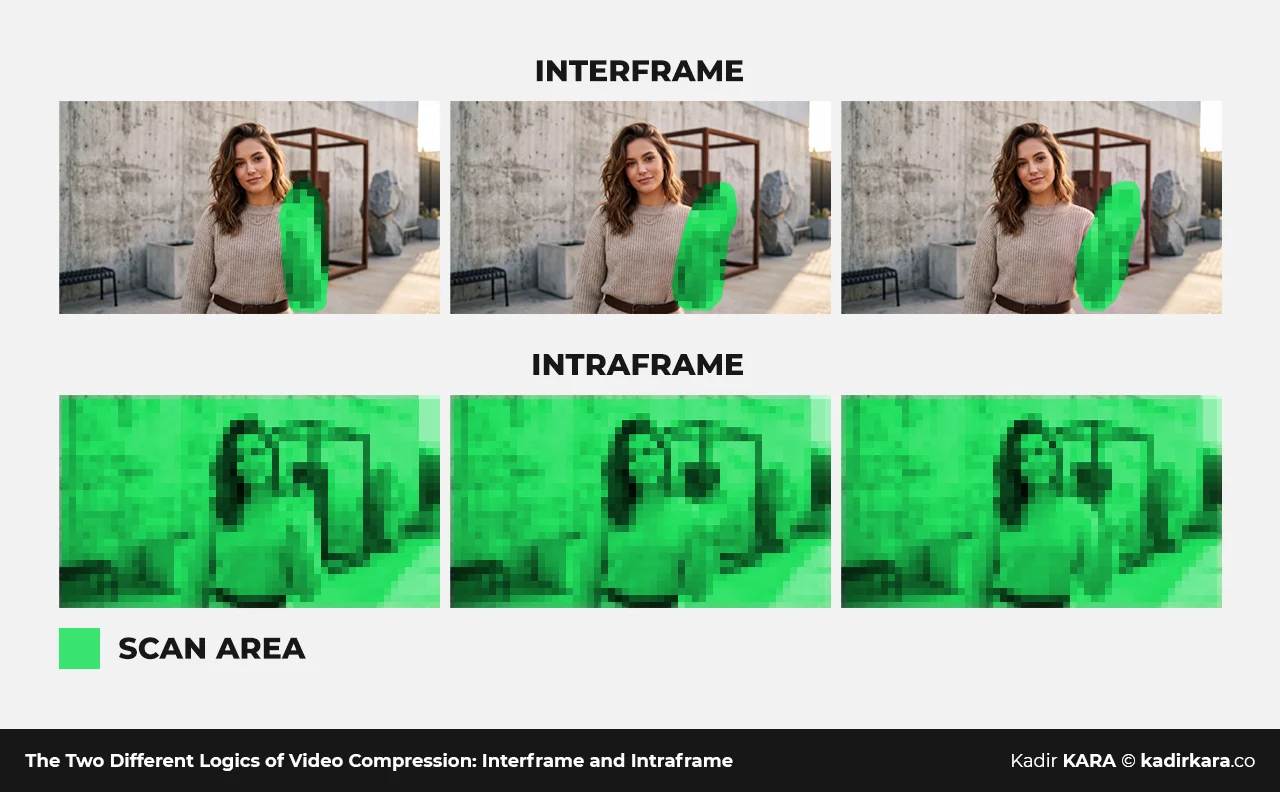
The Two Different Logics of Compression: Interframe and Intraframe
To understand video codecs, you first need to grasp these two fundamental compression approaches. Because a significant part of the differences between H.264, H.265, ProRes, and RAW originates from here.
Interframe: Compression That Builds Relationships Between Frames
Imagine an image: a fixed camera, a character moving in the middle. The background is a wall, a table, a window, and it doesn't change from one frame to the next. Interframe compression comes into play exactly here; it works on the logic of "why would I record something that isn't changing over and over again?" It records the first frame (I-frame) completely — the entire background, the entire character, every pixel. In the following frames, it only writes down what has changed. The character's new position. It doesn't record the background again. This is why files produced with H.264 and H.265 are small; the longer the video runs and the more the background stays fixed, the more efficient the file size remains.
But this efficiency comes at a cost on the editing table. This entire structure is called a GOP (Group of Pictures). When editing software wants to jump to a frame on the timeline, it has to calculate the entire GOP chain leading to that frame from the start, because that frame doesn't exist on its own — it gains meaning through reference to previous frames. When you move the playhead while editing H.264, the screen freezing and the system stuttering is a direct result of this.
Intraframe: Compression That Completes Each Frame on Its Own
Let's go back to the same image: a fixed camera, a moving character. This time, the compression logic doesn't look at the background, doesn't consult the previous frame. It records every single frame completely and independently, whether the background stays exactly the same or changes. ProRes works with this system. As a result, the file size is large; integrity, not efficiency, is given priority.
In return, you get complete freedom on the editing table. Since each frame exists on its own, the editing software can jump instantly to any point on the timeline. There's no chain to calculate, no time to wait. The system doesn't stutter.
To keep it in mind, think of it this way:
Interframe builds relationships between frames, stores the difference, and the file stays small. Intraframe is complete within each frame, stores everything, and the file gets bigger.
NOTE: RAW, on the other hand, falls outside these two categories: it records the raw data coming from the sensor either without any compression at all or with lossless compression.
H.264: The World's Most Widespread Video Codec
H.264, officially named AVC (Advanced Video Coding), was developed by the JVT (Joint Video Team), a joint effort of the ITU-T and ISO/IEC, and was standardized in 2003. Since that day, it has become the fundamental technology that brought video content together with the internet. YouTube, Vimeo, social media platforms, Blu-ray discs, security cameras, smartphone outputs... H.264 is the common denominator of all of them.
Technical Profile:
In its typical implementation, it offers 8-bit color depth and 4:2:0 chroma subsampling. 4:2:0 means that color information is reduced by half both horizontally and vertically. It's a smart optimization that takes advantage of the fact that the human eye is far more sensitive to brightness than to color information. There's a wide spectrum in terms of bitrate. While the 5-15 Mbps range is common for internet delivery, some high-end cameras can go up to 100 Mbps when shooting in 4K.
Strengths:
Universal compatibility. Whichever device, platform, or software you use, H.264 opens. The file size is small, transfer is easy, storage is cheap.
Weaknesses:
8-bit color depth restricts flexibility in color grading during post-production. 4:2:0 chroma subsampling creates limitations in the green channel, opening the door to chroma errors especially in green screen shoots. The GOP structure, meanwhile, negatively affects editing performance. For projects requiring heavy color work, H.264 is an inadequate shooting format.
Where It's Used:
It's the final format for web broadcasting, social media content, and productions with low color grading intensity. In other words, this is the codec that carries the final product to the viewer.
H.265 / HEVC: Achieving the Same Quality with Half the Data
H.265, officially named HEVC (High Efficiency Video Coding), was standardized in 2013. Its design goal was clear: to deliver the same image quality as H.264 at roughly half the file size. And it largely achieved this. The algorithm uses much more advanced compression blocks and prediction methods. As a result, it achieves similar visual quality using approximately forty to fifty percent less data compared to H.264. This advantage carries critical significance especially for 4K and 8K content; carrying high-resolution content at reasonable file sizes is nearly impossible without H.265.
Technical Profile:
H.265 carried 10-bit color depth to a much wider area with mainstream camera and platform support. This depth, which is mandatory for HDR (High Dynamic Range) content, means dozens of times more color values in the transition from shadows to highlights. In terms of chroma subsampling, while 4:2:0 is common, some implementations also offer 4:2:2 support.
Strengths:
Thanks to its efficiency, it carries 4K content at reasonable file sizes. With HDR and wide color gamut support, it's compatible with modern visual standards. Netflix and other major streaming platforms use H.265 extensively for 4K HDR content.
Weaknesses:
The encoding and decoding process requires significantly more processing power compared to H.264. Editing and playback can be problematic on older systems without hardware H.265 acceleration. Historically, patent licensing issues slowed the spread of the standard. This is why some platforms turned to open-source competing codecs like VP9 and AV1.
Where It's Used:
This is the codec used for 4K content delivery, modern streaming platforms, and shooting and archive scenarios where storage efficiency is a priority.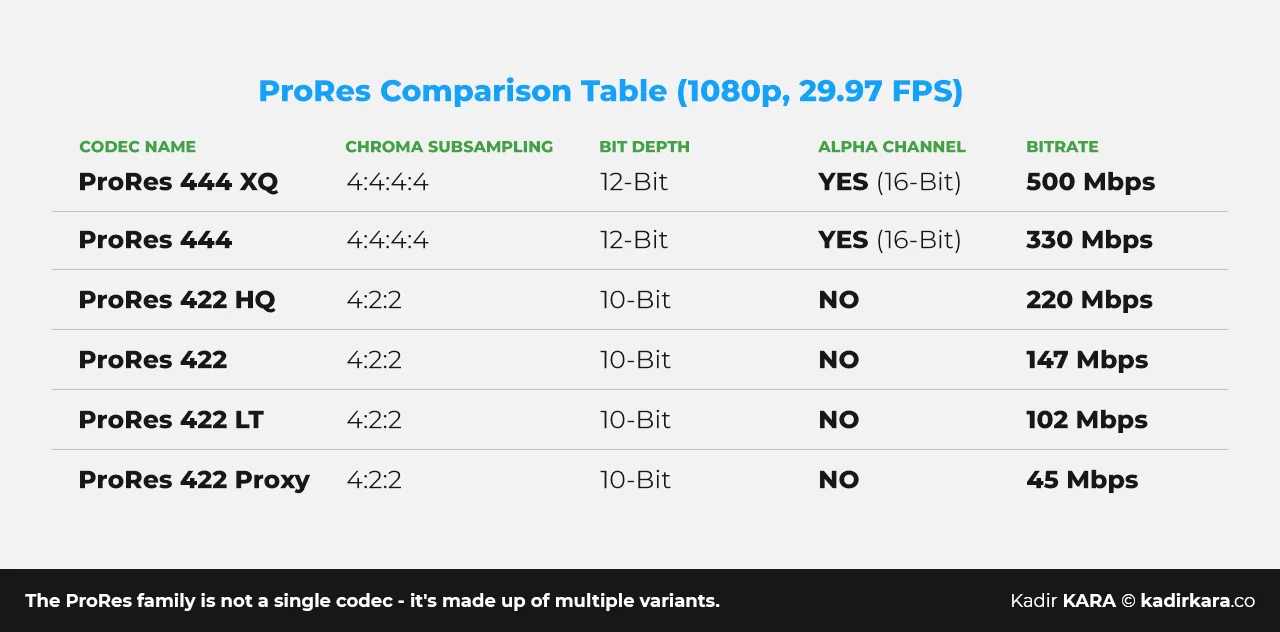
Apple ProRes: The Workhorse of Post-Production
ProRes is an intraframe codec that Apple introduced in 2007 with Final Cut Studio 2, designed for professional post-production. Today, it's the most widespread intermediate format standard in film, advertising, news, and digital content production.
The ProRes family isn't a single codec; it consists of multiple variants that respond to different needs:
ProRes 422 Proxy:
The smallest file-size member of the family. It exists not for the final output but for editing speed: it's preferred on low-capacity systems or when you need to move quickly into assembly editing after intense shooting days. It's the primary carrier of the proxy workflow.
ProRes 422 LT:
One step up from Proxy; more color data, still a reasonable file size. For environments where storage is limited but you don't want to compromise entirely on quality.
ProRes 422:
The standard post-production format; it's right in the middle of the balance. Most editing and color work goes through this.
ProRes 422 HQ:
The high-quality version; for projects with critical color work and broadcast-delivery jobs.
ProRes 4444:
4:4:4 chroma subsampling and 12-bit color depth. With alpha channel support, it's the go-to format for VFX and motion graphics workflows.
ProRes 4444 XQ:
The family's highest quality and largest file-size solution; for those who want to keep data loss close to zero.
The ProRes 422 family offers 10-bit color depth and 4:2:2 chroma subsampling. In 4:2:2, color information is reduced by half only horizontally, vertical information is preserved. This is a meaningful increase in color quality compared to H.264's 4:2:0. This difference is felt noticeably, especially in green or blue background shoots where chroma-related issues stand out.
Why Do Editors Love ProRes?
Thanks to its intraframe structure, editing software can access each frame independently. Jumping back and forth on the timeline doesn't strain the CPU, the system doesn't stutter. Final Cut Pro, Adobe Premiere Pro, and DaVinci Resolve all treat ProRes as a native format. According to Apple's own documentation, ProRes 422 HQ produces approximately 220 Mbps bitrate at 1920×1080 - 29.97 fps. This corresponds to about 100 GB per hour. When you move to 4K, these figures rise dramatically.
Disadvantage:
File size. ProRes is not a delivery format; it's a post-production format. Some cameras (certain ARRI, Sony, and Blackmagic models) can record directly in ProRes. In this case, it takes on the role of both a shooting and an editing format. But no platform delivers ProRes content to viewers.
Where It's Used:
An intermediate format during the editing stage, projects requiring intensive color grading, VFX workflows, broadcast and advertising productions.
RAW: Raw Data, Pure Control
RAW is not a technical codec name; it's a category. It describes the family of formats that record the data coming from the camera sensor in its least processed state, without the debayer (color interpretation) process being applied. Every manufacturer develops its own RAW variant.
- ARRIRAW: The format used by ARRI cameras (Alexa, AMIRA series); the reference standard of the film industry.
- REDCODE RAW (.R3D): RED cameras' proprietary format, offering a variable compression ratio.
- Cinema DNG: An open-source RAW standard adopted by Blackmagic and some other manufacturers.
- Canon Cinema RAW Light (.CRM): The format of Canon cinema cameras.
In RAW video too, every pixel carries the raw light value the sensor measured at that point. Color interpretation — white balance, color science — is left entirely to post-production. This means that certain mistakes made during shooting can be compensated for afterward, provided you stay within the correct exposure range. Maximum flexibility is available in color grading work because you're working with the raw data of the image.
In terms of dynamic range, the RAW format offers data closest to the camera sensor's theoretical maximum. This means more recovery capacity in both shadows and overly bright areas. If you're pushing the limits of light in a scene, this advantage of RAW actually becomes visible in post-production.
Disadvantage:
Almost everything. File sizes are extraordinarily large. Every frame has to go through the debayer process in post-production; this requires serious processing load and specialized software. The workflow gets more complicated, team requirements increase, and costs go up.
Where It's Used:
Feature films, high-budget commercials and music videos, every project where color work carries central importance. It covers all jobs where "finishing everything in-camera" isn't possible, where the image needs to be shaped in post-production.
Which Codec, for Which Job?
A Practical Decision Guide To turn all this technical knowledge into a concrete decision, all you need to do is ask yourself a few questions before shooting.
What Is the Video Being Recorded For?
If it's for social media, a platform, or a website, delivery is done with H.264 or H.265. No platform delivers ProRes or RAW to viewers.
How Critical Is Color Grading?
If you're planning aggressive color grading, 8-bit H.264 won't hold up to it. Banding, chroma noise, and color breakup become inevitable. You need 10-bit H.265 or ProRes. If there's heavy VFX or extensive color science work, consider ProRes 4444 or RAW.
What's Your Editing Workflow Like?
If you're going to edit the footage you shot directly and your system isn't powerful, you'll have difficulty with H.264. You either need to set up a proxy workflow or take advantage of ProRes's intraframe benefit.
Do You Have the Storage and Budget?
RAW and ProRes 4K shooting require serious storage infrastructure. On limited budgets, H.265 offers a strong balance point.
What Formats Does Your Camera Support?
This question might need to be put at the very top of the list. The entire codec discussion is limited by the options your camera offers. Many camera operators research which codec they should choose, only to later realize their camera only records H.264. Get to know your camera first; have the discussion within those limits.
Practical Rule: The format you deliver in doesn't have to be the same as the format you shoot in. Shoot RAW, edit in ProRes, deliver in H.265. This three-stage flow is the standard logic of professional production. Each format does its job at its own stage, and there's no hierarchy between them, but if the place of use is chosen incorrectly, each one creates problems.
A SHORT NOTE
When I explain the codec topic to someone just stepping into video production, most of the time I see the same thing: their eyes glaze over a little, and then they ask, "okay, but which one should I choose?" I still find this question valid today, and I meet it with understanding. But I also know this: once the codec matter is learned, it clarifies hundreds of small decisions, and you end up solving the logic behind many problems — why editing is slow, why color work isn't going the way you want, why the image gets degraded at delivery.
My purpose here was to both build the fundamental concepts on solid ground and explain why each codec exists, which problem it solves. Choosing a format isn't about memorizing a rule; it's about reading the logic of the project and choosing the tool that fits that logic.
DID YOU KNOW? - 7 QUESTIONS, 7 ANSWERS
1. Are Codec and Container the Same Thing?
No. A container (wrapper format) is the file structure that holds video, audio, and metadata together: .mp4, .mov, .mkv, and so on... A codec, on the other hand, is the algorithm that determines how the video is compressed inside. A .mov file can contain either H.264 or ProRes. Confusing these two concepts leads to inconsistent errors, especially during delivery and format conversion stages.
2. Can I Tell the Difference Between H.264 and H.265 with My Eyes on Screen?
Yes, if you do a side-by-side comparison at the same bitrate. Especially in scenes involving motion, H.265 is less prone to block artifacts. But H.265's real advantage isn't image superiority, it's efficiency: it delivers the same quality as H.264 in a much smaller file. For equivalent quality, H.265 uses roughly half the capacity. This means a serious gain, especially in 4K and streaming scenarios.
3. Why Isn't ProRes a Delivery Format?
Because of file size. ProRes is designed for editing and color work. According to Apple's documentation, ProRes 422 HQ produces approximately 220 Mbps bitrate at 1080p/29.97. That means about 100 GB per hour. When you move to 4K, this figure comfortably exceeds 300 GB. Also, not all platforms and devices can play ProRes without issues. The final output is always converted to a delivery codec like H.264 or H.265.
4. Does White Balance Really Matter When Shooting RAW?
It's far less critical in terms of image quality, because in RAW, in-camera color interpretation is handed off to post-production. It records white balance as metadata, it doesn't bake it into the pixels. In theory, it can be freely changed in post-production. But shooting with the correct white balance speeds up the post-production process and lets the eye work with a reliable reference image. The approach of "let it be off in RAW, I'll fix it" is technically correct but operationally costly.
5. Why Do Some Editors Hate Working with H.264 Footage?
Because of the GOP (Group of Pictures) structure. In H.264, not every frame is a complete image on its own. Some frames only contain change information relative to previous or following frames. When editing software wants to go to a specific frame, it has to calculate the GOP chain from the start. This is why jumping back and forth on the timeline is slow and CPU-intensive. This problem doesn't exist in ProRes. Every frame is independent and instantly accessible.
6. What's the Practical Visual Importance of 10-Bit Color Depth?
An 8-bit channel has 256 distinct color values. In 10-bit, this number rises to 1024. When you evaluate all three channels together, the difference means an enormous color space. While 8-bit offers approximately 16.7 million colors, 10-bit theoretically holds over 1 billion color values. During color grading, this depth directly prevents the banding problem that would otherwise be a dead end, especially in sky gradients and skin tones. The transition between two colors close to each other looks much smoother and error-free.
7. Is the Original Codec Quality of the Video You Upload to a Platform Preserved?
No. Instagram, YouTube, TikTok, and all other platforms re-encode (transcode) the uploaded video according to their own codec and bitrate standards. Whether you upload H.264 or ProRes, the platform ultimately applies its own compression. That said, when the quality of the starting file is high, the loss after re-encoding is smaller. That's why it makes sense to use a high-bitrate H.264 or H.265 for delivery to a platform. Uploading ProRes increases the file size but has very little effect on the resulting image quality.


